.png?width=200&height=105&name=Newsletter%20Images%20(27).png)
The Support section in Company Settings controls which contact options are available to customers in the Tenant Connect® Contact Us page. Operators can choose whether customers are able to:
- Email the facility
- View the facility phone number
Open Support Settings
Contact settings are managed in two areas of the Tenant Connect Operator Portal:
- Company Settings → Support — Controls which contact options are displayed.
- Tenant Connect → Subdomains → Profile — Stores backup contact information.
Support Settings
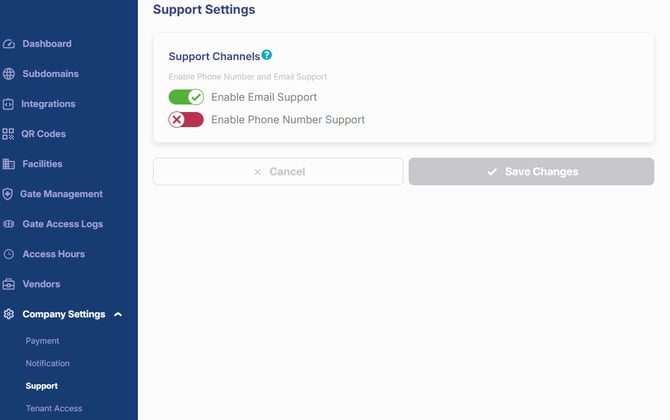
To configure the Contact Us page: Company Settings → Support
Available settings include:
- Email Support — Displays the Email Us option on the Contact Us page.
- Phone Number Support — Displays the facility phone number on the Contact Us page.
If a setting is disabled, that contact option will not appear for customers.
Backup Contact Information
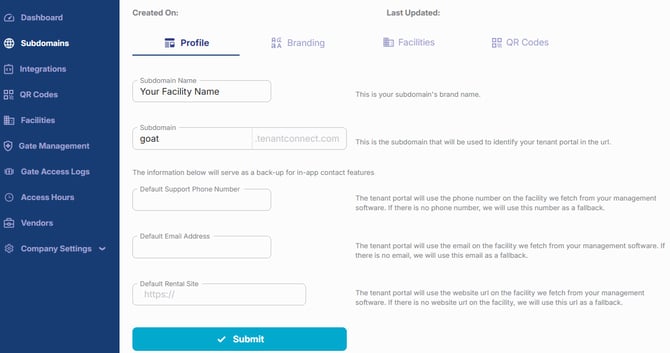
Tenant Connect first attempts to display contact information from the connected Facility Management Software (FMS). If the required information is unavailable, Tenant Connect uses the backup contact information configured for the subdomain.
To review or update the backup information: Tenant Connect → Subdomains → Profile
Available backup fields include:
- Default Support Phone Number
- Default Email Address
Keeping this information up to date helps ensure customers can contact the facility if contact information is unavailable from the FMS.
How Contact Information Is Displayed
When support options are enabled:
- Tenant Connect first displays contact information from the Facility Management Software (FMS).
- If the information is unavailable, Tenant Connect uses the backup contact information from the Subdomain Profile.
Depending on the enabled settings, customers may see:
- Email Us
- Facility phone number
- Both options
For more information about the customer experience, see Contact Us.