.png?width=200&height=105&name=Newsletter%20Images%20(27).png)
This article helps operators understand what tenants see on the tenant-facing side of Tenant Connect and the different options available to them. The options shown will vary depending on the configuration of the facility’s Tenant Connect settings.
Home Screen
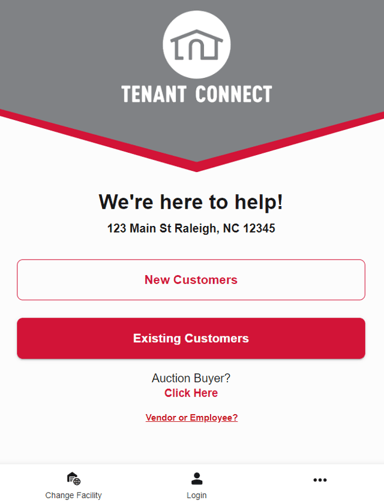
The Tenant Connect® home screen displays the name and address of the facility, and serves as the landing page for tenants, new/existing customers, auction buyers, vendors/employees, or visitors navigating to a facility's Tenant Connect®. The home screen includes options for:
- New Customers - For tenants who are not current renters at the facility.
- Existing Customers - For tenants who are existing renters at the facility.
- Auction Buyers - For tenants who have purchased an auction unit.
- To enable or disable auction buyer altogether visit Tenant Connect's Company Settings tab > Payment > toggle on/off the support auction buyers setting.
- Vendors or Employees - For vendors or employees of the facility.
- Change Facility - To change or select a different facility.
- Login - To log in to an existing Tenant Connect account.
New Customers
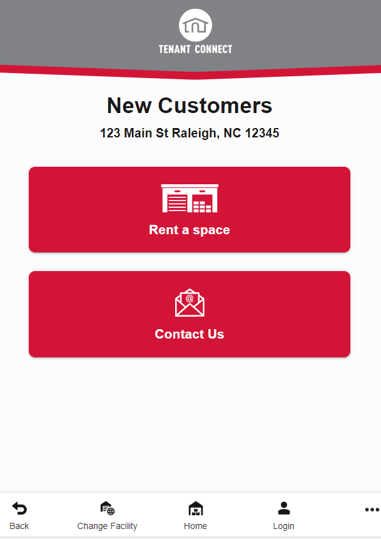
New customers are provided options to rent a space or contact the facility.
- Rent a space - Prompts new tenants to begin the rental flow.
- To update the rental URL, visit Tenant Connect's Subdomains tab > Subdomain > pencil icon > update Default Rental Site.
- Contact Us - Displays phone number or email info. for the facility.
- To update the email or phone number, visit Tenant Connect's Subdomains tab > Subdomain > pencil icon > update Default Support Number or Default Email Address. To enable or disable the email or phone number altogether visit Company Settings tab > Support > toggle on/off the email or phone number setting(s).
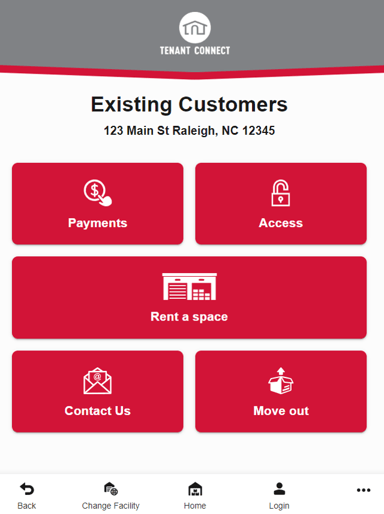
Existing Customers
Existing Customers are provided options to initiate payments, gain access, rent a new space, initiate a move-out, or contact the facility.
- Payments - Enables tenant payments for units on their account.
- Access - Enables tenants to access their lock or gate codes.
- Rent a space - Prompts tenants to begin the rental flow.
- Contact Us - Displays phone number or email info. for the facility.
- To update the email or phone number, visit Tenant Connect's Subdomains tab > Subdomain > pencil icon > update Default Support Number or Default Email Address. To enable or disable the email or phone number altogether visit Company Settings tab > Support > toggle on/off the email or phone number setting(s).
- Move out - Enables tenants to begin the move out flow.
- To enable or disable auction buyer altogether or adjust unit photo requirements, visit Tenant Connect's Company Settings tab > Notification > toggle on/off the allow tenants to initiate move-out and/or move-out photo setting(s).
- To update the email used for move-out notifications, visit Tenant Connect's Company tab > Notification > Move out email.