.png?width=200&height=105&name=Newsletter%20Images%20(27).png)
The Move Out option allows tenants to submit a photo showing that their unit has been emptied.
Important: Submitting a move-out photo through Tenant Connect® does not complete the move-out in the Facility Management Software (FMS). Facility staff must still review the submission and complete any required move-out steps in the FMS.
Where Move Out Appears
Tenants will see the Move out option within the Existing Customers screen. The option shown may vary depending on the facility’s Tenant Connect settings.
- From the Existing Customers screen, select Move Out.
-
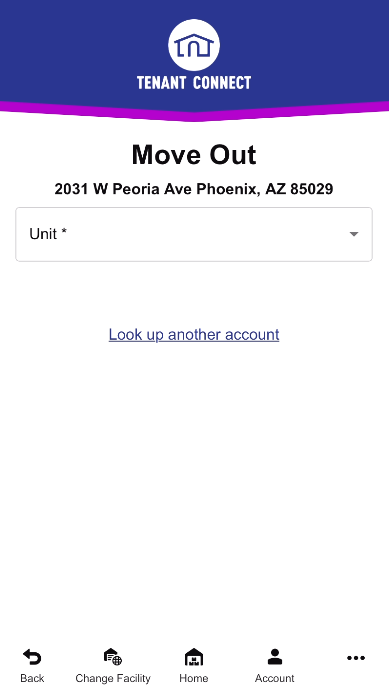
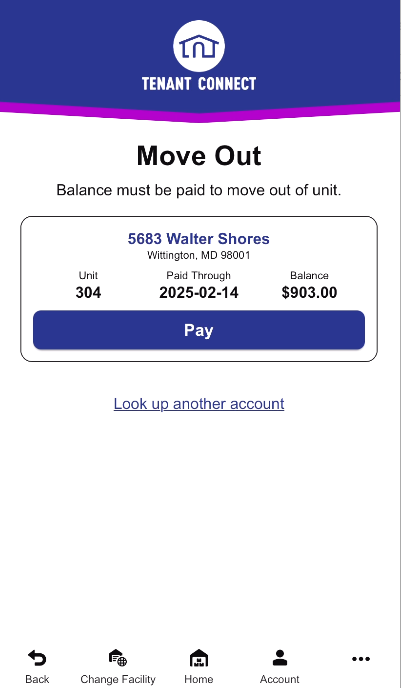
Select the unit. If multiple units are associated with the account, select the unit you want to move out of. If the unit has an outstanding balance, Tenant Connect may notify you that payment is still due before the move-out can be completed.
- Take a photo, review the photo, or submit the photo to validate that the unit has been emptied. For best results:
- Capture the entire empty unit.
- Include the unit number in the photo whenever possible.
- Upon submitting the photo, the facility is notified by email that the unit has been emptied.
- Facility staff review the submission and complete any remaining move-out steps in the Facility Management Software (FMS).
For more information about notification emails, see Move-Out Notification Settings.