.png?width=200&height=105&name=Newsletter%20Images%20(27).png)
Note: Improper installation may cause damage and malfunction. Please consult a certified technician if you need.
G.O.A.T. Installation Guide.pdf
We have now launched the GOAT Installer App! This will walk you through the steps during installation.
GUIDED INSTALLATION WEBSITE: goatinstall.tenantconnect.com
Tools Required:
- Screwdriver (Phillips and flathead)
- Wire strippers/cutters/crimpers
- Double-sided adhesive (Recommended)
- Mounting screws (Optional)
Safety Precautions:
- Ensure the power is turned off before proceeding with installation. Turn off power to the gate at the breaker and disable any back-up power sources.
- Verify all connections before powering on.
Prepare the Gate Operator
- Remove the cover of the gate operator.
- Determine availability of a 120V outlet inside the housing.
- If there is no 120V outlet, locate a power source between 12V & 24V on the gate operator that has at least 5W of capacity.
- Use at least 18-gauge wire for connections.
Locate Open Command
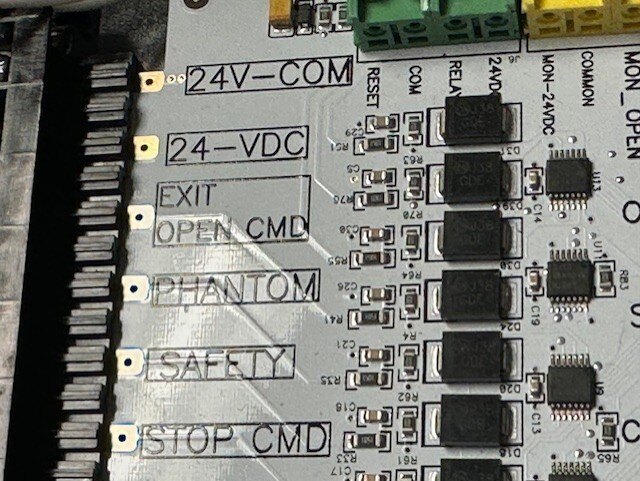
- Identify the board terminal that triggers the gate to open (OPEN COMMAND / EXIT COMMAND).
- It is recommended to use a ‘jumper’ to test the functionality of this connection.
- Ensure the gate responds correctly before proceeding.
Power Down for Safety
- Open the gate and leave it open during the installation process.
- It is recommended to allow tenants to access the facility
- Turn off the power to the operator.
- Disconnect any battery backup to prevent accidental power-on.
Determine Placement
- Identify an ideal mounting location under the operator cover.
- Ensure it will not obstruct other components.
- Ensure the G.O.A.T. is not installed within two inches of metal near the antennae.
- We will secure the G.O.A.T. enclosure using screws or double-sided adhesive (do not attach to the operator yet).
Connect Wiring to Board
- Identify the NO (Normally Open) and COM (Common) terminals.
- Ensure G.O.A.T. is set to NO (Normally Open).
- Tighten all terminal screws to ensure a solid connection.
- Plug the prewired AC-DC power supply into the available gate operator 120V outlet.
- If a 120V outlet is not available, gently press down on the wire release button with small screwdriver to remove the wires. Wire the DC power to the device, careful not to make the power wires taught. Leave a small amount of extra wire to prevent strain.
- Positive 12-24 V to the “V+” pin
- Ground or 0V to the “GND” pin
- Tighten the cable glands by hand
- If a 120V outlet is not available, gently press down on the wire release button with small screwdriver to remove the wires. Wire the DC power to the device, careful not to make the power wires taught. Leave a small amount of extra wire to prevent strain.
Verify Keypad Functionality (If Applicable)
- If using a keypad in tandem, test its functionality now.
- Send a test signal to open the gate.
- Ensure the keypad does not interfere with the G.O.A.T. operation.
Final Wiring & Power Up
- Route wiring neatly to the board.
- Trim any excess wiring for a clean installation.
- Make final connections to the board.
- Power on the gate operator and check for errors.
Test Full Operation
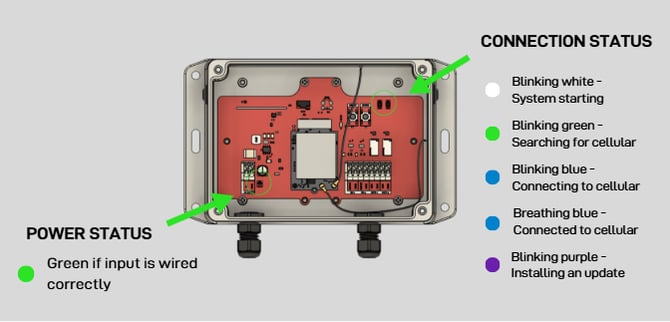
- Verify the Power light on the bottom left is on and green.
- Verify the Status light on the top right is breathing blue (connected to cellular).
- Verify one of the open commands below opens the gate.
- Scan the Tenant Connect QR code
- Use a vendor access code
- Use the Tenant Connect portal (tenant-facing)
- Use the Tenant Connect Operator portal (operator-facing)
Final Checks & Troubleshooting
- Verify all components are securely installed.
- Replace the operator cover once all tests pass.
- Mount the G.O.A.T. inside the gate operator housing using the pre-drilled holes in each corner of the unit or provided double-sided tape. Use caution not to damage electronics when using screws.
- Issue: Device does not power on.
- Solution: Check wiring and verify 24V DC power source. Verify with the Green Power Light (bottom left corner)
- Issue: Gate does not open when commanded.
- Solution: Verify NO and COM wiring on the G.O.A.T., test operator board with jumper.
Congratulations! You have successfully installed the G.O.A.T. device.