.png?width=200&height=105&name=Newsletter%20Images%20(27).png)
Tenant Connect® is a two-part platform that enables self-storage operators to create a customized digital experience for their tenants. By integrating with your Facility Management Software (FMS), Tenant Connect helps automate common tenant interactions while reducing manual work for facility staff.
The platform consists of two connected experiences:
- The Operator Portal, where users configure and manage Tenant Connect.
- The Tenant Experience, where tenants interact with the customized experience created by the operator.
Together, these experiences provide a secure, app-free solution that allows tenants to complete common tasks by simply scanning a Tenant Connect QR code.
Why Use Tenant Connect?
Tenant Connect helps operators:
- Reduce office traffic by enabling self-service
- Streamline move-ins and move-outs
- Simplify tenant payments
- Provide secure gate and unit access
- Deliver a branded digital experience
- Improve operational efficiency
- Support GOAT® (Gate Operator Access Technology)
How Tenant Connect Works
Tenant Connect integrates with your Facility Management Software (FMS) to securely retrieve information such as:
- Facilities
- Tenants
- Units
- Payments
- Rentals
- Access permissions
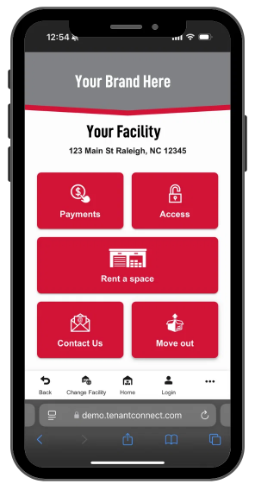
Using this information, Tenant Connect presents a customized experience based on the tenant's account, the selected facility, and the configuration established in the Operator Portal. Depending on the operator's configuration, tenants may be able to:
- Rent a space
- Make payments
- Request gate or door access
- Unlock DaVinci Lock® units
- Contact the facility
- Submit move-out requests
- Complete auction buyer workflows
- Access vendor or employee features
Because every facility can be configured differently, the features available to tenants may vary.
The Two Tenant Connect Experiences
The Operator Portal is the administrative side of Tenant Connect. This is where users configure and manage the tenant experience. From the Operator Portal, users can:
- Connect a Facility Management Software (FMS)
- Import and manage facilities
- Create and manage subdomains
- Customize branding
- Generate Tenant Connect QR codes
- Configure company settings
- Manage gate access and security settings
- Configure notifications, vendors, and payment options
Changes made in the Operator Portal are reflected in the tenant-facing experience, allowing operators to create a customized experience for each facility.
The Tenant Experience is the customer-facing side of Tenant Connect.
After scanning a Tenant Connect QR code, tenants are presented with the services available for their facility and account. Depending on the facility's configuration, tenants may be able to:
- Rent a space
- Make a payment
- Request gate or door access
- Unlock a DaVinci Lock® unit
- Contact the facility
- Submit a move-out request
- Complete an auction buyer workflow
- Access vendor or employee features
Because every facility can be configured differently, the options available to tenants may vary.
Getting Started
To begin using Tenant Connect, configure the Operator Portal using the articles below.