.png?width=200&height=105&name=Newsletter%20Images%20(27).png)
The Integrations page allows operators to connect Tenant Connect® to their Facility Management Software (FMS).
An active integration allows Tenant Connect to import facility, tenant, unit, payment, rental, and access information from the FMS. An integration must be configured before facilities can be assigned to a subdomain or used in the tenant-facing Tenant Connect experience.
Supported Facility Management Software
Tenant Connect currently supports integrations with:
- SiteLink
- Storable Edge
- Storable Easy
- SSM Cloud
Open Integrations
To manage integrations: Tenant Connect → Integrations
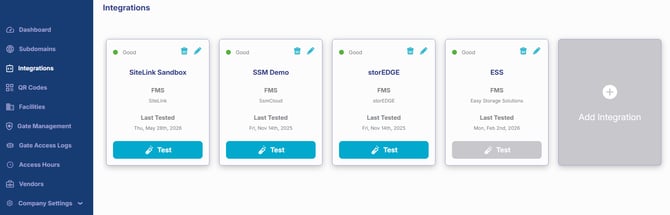
Integrations Overview
The Integrations page displays all configured integrations. For each integration, operators can view:
- Integration name
- Facility Management Software (FMS)
- Last tested
- Edit button
- Delete button (when applicable)
From this page, operators can also select Add Integration to configure a new connection.
Add an Integration
To create a new integration:
- Select Add Integration.
- Choose your Facility Management Software (FMS).
- Enter the required connection information.
- Save the integration.
After selecting an integration type, Tenant Connect displays the fields required for that software.
View Integration Instructions
Each integration includes setup instructions specific to the selected Facility Management Software. To view the instructions:
- Select your integration type.
- Select the Information icon.
The setup guide explains the information and credentials required to complete the integration. For detailed instructions, see the integration guides below for your Facility Management Software.
- Integrate SiteLink with Tenant Connect
- Integrate Storable Edge with Tenant Connect
- Integrate SSM Cloud with Tenant Connect
- Integrate Storable Easy with Tenant Connect
Test the Integration
After entering the required information, test the integration to verify that Tenant Connect can communicate with the Facility Management Software. Successful testing confirms that facility information can be imported into Tenant Connect.
Integration testing is not currently available for Storable Easy.
Next Steps
After the integration has been configured:
- Verify that your facilities have been imported.
- Assign facilities to a Subdomain.
- Create your Tenant Connect QR codes.
- Test your tenant experience before deployment.
For more information, see: